

Subway Gift Card Balance: Check Online, In-App & Without Registering (2026)
Want to check your Subway gift card balance before ordering? You can view your remaining funds online through Subway’s official website or mobile app if your card is registered. For unregistered cards, visit a participating Subway restaurant to request a balance check.
This 2026 guide explains how to check your Subway card balance online, without registering, by phone, or in-store, plus where to find your card number and PIN.
Before spending your gift card balance, explore the latest Subway menu with prices to compare sandwiches, sides, and meal options.
How to Check Subway Gift Card Balance
You can check your Subway gift card balance online, through the Subway app, by phone, or at a participating restaurant. The best method depends on whether your gift card is registered.
| Balance Check Method | Registration Required? | What You Need |
|---|---|---|
| Subway Official Website | Yes | Registered Subway card and account |
| Subway Mobile App | Yes | Subway account with linked gift card |
| In-Store Balance Check | No | Physical or digital gift card |
| Phone Balance Inquiry | No online registration required | Gift card number and requested verification details |
Check Subway Gift Card Balance Online at Subway.com
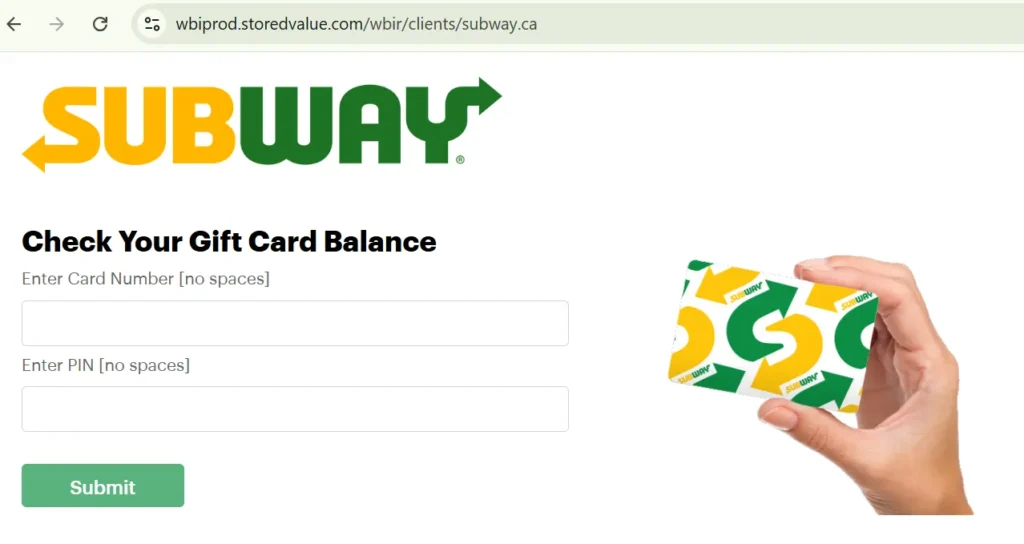
You can check your Subway gift card balance online through Subway’s official website if your card is registered. You’ll need access to the Subway account linked to your gift card.
Steps to Check Your Subway Card Balance Online
- Visit the official Subway gift card page.
- Select Balance Inquiry to access the balance-checking service.
- Sign in to your Subway account if prompted.
- Select your registered gift card.
- View your available balance and any transaction details provided.
Important: If your Subway gift card isn’t registered, you can request a balance check at a participating Subway restaurant without creating an online account.
How to Check Subway Gift Card Balance Without Registering
You can check your Subway gift card balance without registering by visiting a participating Subway restaurant. This method doesn’t require creating an online account or downloading the Subway app.
Steps to Check Your Balance Without an Account
- Visit a nearby Subway restaurant.
- Bring your physical gift card or digital Subway eGift card.
- Ask the cashier to check your remaining gift card balance.
- Present your card or eGift card barcode for verification.
- The cashier can check your available balance through the restaurant’s payment system.
Check Subway Gift Card Balance Using the Subway App
You can check your gift card balance through the Subway mobile app if your card is registered and linked to your account. The app is available for iPhone and Android devices.
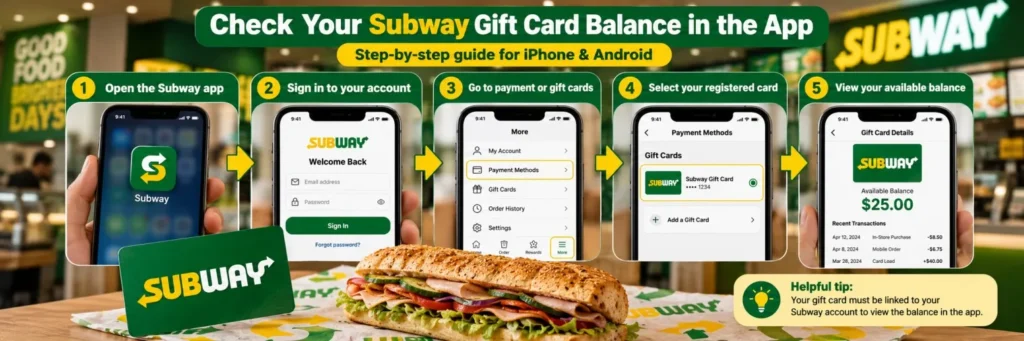
Steps to Check Your Balance in the Subway App
- Open the Subway app on your iPhone or Android phone.
- Sign in to your Subway account.
- Navigate to the payment methods or gift card section.
- Select your registered Subway gift card.
- View your available balance if displayed.
Check Subway Gift Card Balance by Phone or In-Store
You can check your Subway gift card balance by calling 1-877-697-8222 or visiting a participating Subway restaurant. These options are useful if you don’t have an online account or cannot access the Subway app.
Check Subway Card Balance by Phone
- Call 1-877-697-8222, Subway’s published gift card support number.
- Follow the automated instructions or speak with a representative.
- Provide your Subway gift card number and PIN when requested.
- Ask for your available gift card balance.
Check Subway Gift Card Balance In-Store
- Visit a participating Subway restaurant near you.
- Present your physical Subway gift card or digital eGift card.
- Ask the cashier to check your remaining balance.
- The cashier can process a balance inquiry through the restaurant’s payment system.
Helpful tip: Keep your gift card number and PIN private. Subway gift card balances do not expire, so you can save your remaining funds for a future purchase.
Where to Find Your Subway Gift Card Number and PIN
Your Subway gift card number and PIN help identify your card for registration, online payments, and balance inquiries. Their locations depend on whether you have a physical card or digital eGift card.
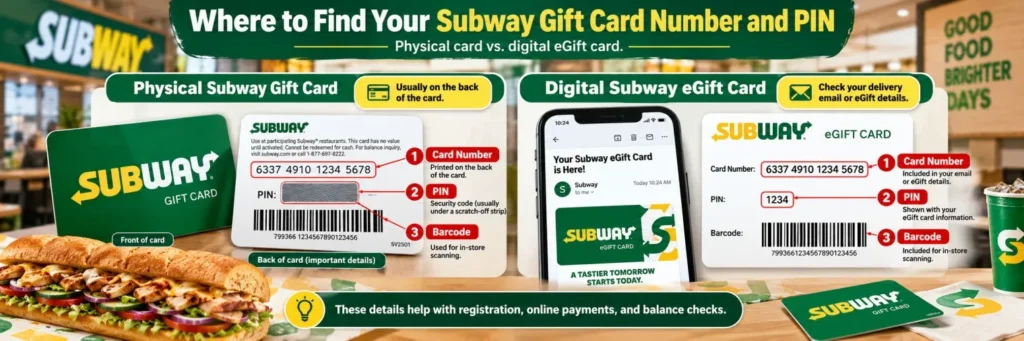
Physical Subway Gift Card
- Card Number: Usually printed on the back of the gift card.
- PIN: Look for a security code on the back, sometimes concealed beneath a scratch-off coating.
- Barcode: May appear on the back for scanning at participating Subway restaurants.
Digital Subway eGift Card
- Card Number: Included in your gift card delivery email or digital card details.
- PIN: Provided with the eGift card information, when applicable.
- Barcode: May be included for convenient in-store redemption.
Helpful tip: If your card number or PIN is unreadable, contact Subway gift card support at 1-877-697-8222. Keep your card and purchase receipt available for verification.
How to Reload a Subway Gift Card
You can reload your Subway gift card online, through the Subway app, or at participating restaurants. Online and app reloads require a registered card, while in-store reloads don’t require registration.
Steps to Reload Your Subway Card Online
- Visit the official Subway gift card page.
- Click Reload a Card.
- Sign in to your Subway account if prompted.
- Select your registered gift card.
- Enter the amount you want to add.
- Complete payment using an accepted credit card.
- Check your updated gift card balance.
Helpful tip: For an unregistered physical card, ask a Subway cashier to add funds using cash or a credit card.
Before using your gift card, explore the latest Subway coupons and deals to find available discounts on sandwiches, Footlongs, and combo meals.
Why Is My Gift Card Balance Not Showing?
Your Subway gift card balance may not appear because of an unregistered card, incorrect card details, a temporary system error, or an account issue. Most problems can be resolved by checking your information or contacting Subway support.
Common Subway Gift Card Balance Problems
| Problem | How to Fix It |
|---|---|
| Gift Card Not Registered | Register your card for online balance access, or check it in-store. |
| Incorrect Card Number or PIN | Recheck the digits and security code before submitting. |
| Card Not Showing in Subway App | Sign in to the account linked to your gift card. |
| Balance Checker Not Loading | Refresh the page or try again using another browser. |
| Reloaded Balance Not Updated | Check your receipt and contact support if funds remain missing. |
| Gift Card Shows $0 Unexpectedly | Review available transaction details and report suspicious activity. |
| Damaged or Unreadable Card | Contact Subway support with your card and purchase receipt. |
Need additional help? Call 1-877-697-8222 for Subway gift card assistance. Have your card details and proof of purchase available, but never share your PIN with an unverified third party.
If your gift card balance cannot cover the entire order, check whether Subway takes Apple Pay as another payment option. Ask the restaurant whether it supports split payments.
Subway Gift Card Rules You Should Know
Subway gift cards never expire, have no inactivity fees, and can be used at participating U.S. restaurants. However, certain restrictions apply to card balances, replacements, and cash redemption.
Subway Gift Card Terms & Conditions (2026)
| Gift Card Policy | Details |
|---|---|
| Expiration | Standard gift card balances never expire |
| Inactivity Fees | No inactivity or maintenance fees |
| Maximum Card Balance | $500 |
| Reloadable | Yes, for eligible gift cards |
| Cash Redemption | Not permitted except where required by law |
| Buy Other Gift Cards | Not allowed |
| Lost or Stolen Cards | Replacement requires prior registration and proof of purchase |
| Where to Use | Participating Subway restaurants, website, and mobile app |
What Happens If You Lose Your Subway Gift Card?
Subway may replace the remaining balance if your card was registered before being lost or stolen. You’ll also need proof of purchase.
Important: Promotional Subway cards may have different expiration rules. Always check the terms printed on your card or included with your eGift card.
Subway also accepts SNAP benefits at select authorized restaurants. Learn whether Subway takes EBT and who qualifies for the Restaurant Meals Program.
Frequently Asked Questions
Can I Check My Subway Card Balance Without a PIN?
Yes, you can request a balance check at a participating Subway restaurant by presenting your physical or digital gift card. Online inquiries may require your card’s PIN and account verification.
Can I Check My Gift Card Balance Without an Account at Subway?
Yes, you can check an unregistered Subway gift card at a participating restaurant. Ask the cashier for a balance inquiry. Online balance checks generally require registration.
Can I Transfer My Gift Card Balance to Another Card?
Subway does not generally offer direct balance transfers between gift cards. For damaged cards or replacement requests, contact customer support. Transfers or replacements depend on the applicable gift card terms.
Can I Use My Subway Gift Card Balance for Online Orders?
Yes, eligible registered Subway gift cards can be used for purchases through Subway’s official website or mobile app. Select the gift card payment option at checkout.
What Happens If My Gift Card Balance Reaches Zero?
You can reload an eligible Subway gift card online, in the app, or at a participating restaurant. The card remains reusable unless it’s damaged, deactivated, or otherwise restricted.


