
Does Subway Take Apple Pay in 2026? (In-Store, App & Online)
Does Subway take Apple Pay in 2026? Yes, Subway accepts Apple Pay at participating U.S. locations, allowing customers to pay with an iPhone or Apple Watch using contactless payment terminals.
Whether you’re ordering a Footlong sandwich, Protein Pocket, or Subway meal, Apple Pay offers a quick, secure way to pay. This guide explains how to use Apple Pay at Subway, its availability in the app, online, and at drive-thrus, plus other accepted payment methods.
Before ordering, explore the latest Subway menu with prices to compare sandwiches, calories, and meal deals.
Does Subway Take Apple Pay in 2026?
Yes, Subway takes Apple Pay at participating U.S. restaurants, including in-store counters with NFC-enabled payment terminals. Customers can pay using an iPhone or Apple Watch without carrying cash or a physical credit card.
However, Apple Pay availability depends on how you place your Subway order.
Where Can You Use Apple Pay at Subway?
| Ordering Method | Apple Pay Availability |
|---|---|
| In-Store Counter | Yes, at contactless terminals |
| Subway Drive-Thru | Yes, where contactless payment is supported |
| Subway Mobile App | Check available payment options at checkout |
| Subway Website | Available only when Apple Pay appears at checkout |
| Apple Watch | Yes, at compatible contactless terminals |
| Self-Service Kiosks | Depends on the kiosk’s payment system |
| DoorDash & Uber Eats | Depends on the delivery app’s checkout options |
Quick tip: Look for the contactless payment symbol at the Subway register. If you’re ordering through the Subway app or website, check for the Apple Pay button before completing your purchase.
How to Use Apple Pay at Subway
Paying with Apple Pay at Subway is quick and convenient. You only need an iPhone or Apple Watch with a debit or credit card added to Apple Wallet.
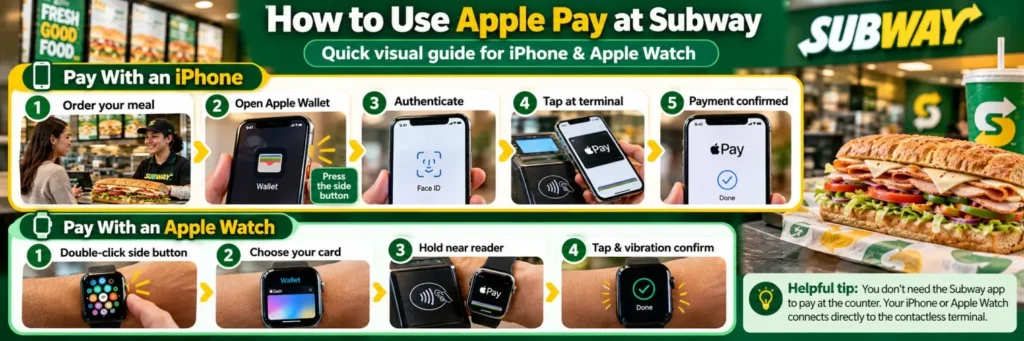
Pay With an iPhone
- Order your favorite Subway sandwich, wrap, or meal.
- Double-click your iPhone’s side button to open Apple Wallet.
- Authenticate using Face ID, Touch ID, or your passcode.
- Hold your iPhone near the contactless payment terminal.
- Wait for the checkmark and Done message to confirm payment.
Pay With an Apple Watch
- Double-click the side button on your Apple Watch.
- Select your preferred payment card.
- Hold the watch near Subway’s contactless card reader.
- Wait for the tap and vibration confirming the transaction.
Helpful tip: You don’t need to open the Subway app to pay with Apple Pay at the counter. Your device communicates directly with the NFC-enabled payment terminal.
Is Apple Pay Safe to Use at Subway?
Yes, Apple Pay is a secure payment method at Subway. It uses tokenization, encryption, and device authentication to protect your financial information.
- Tokenization: Replaces your actual card number with a device-specific number.
- Face ID or Touch ID: Secures payments through biometric authentication or a passcode.
- Encrypted Payments: Protects transaction data during checkout.
- Privacy: Subway never receives your actual credit or debit card number.
Can You Use Apple Pay on the Subway App or Website?
Apple Pay availability on the Subway app and website depends on the checkout options offered for your order. Unlike in-store contactless payments, Apple Pay is not guaranteed for every online transaction.
How to Check Apple Pay on the Subway App
- Open the Subway app on your iPhone.
- Choose your restaurant and select your sandwiches, sides, or drinks.
- Add your items to the cart and proceed to checkout.
- Look for Apple Pay among the available payment methods.
- If available, select it and authorize payment using Face ID or Touch ID.
Does Subway Accept Apple Pay for Website Orders?
Subway’s online ordering platform allows customers to customize meals and select pickup or delivery. However, Apple Pay works only when the checkout displays it as a supported payment option.
If Apple Pay isn’t listed, choose another accepted payment method, such as a credit or debit card.
Helpful tip: Subway’s app also supports QR-code payments through its Show Card feature. This is different from tapping Apple Pay at a contactless terminal.
Does Subway Take Apple Pay at the Drive-Thru?
Yes, Subway drive-thru locations may accept Apple Pay when their payment terminals support contactless transactions. Customers can pay using an iPhone or Apple Watch without handing over a physical card.
Here’s how to use Apple Pay at a Subway drive-thru:
- Place your sandwich or meal order at the drive-thru speaker.
- Ask the cashier whether contactless payment is available.
- Open Apple Wallet and authenticate your payment.
- Hold your iPhone or Apple Watch near the NFC-enabled card reader.
- Wait for payment confirmation before collecting your order.
Quick tip: Some Subway drive-thrus use card readers that employees operate inside the payment window. Confirm Apple Pay acceptance before placing your order to avoid payment issues.
What Payment Methods Does Subway Accept?
Subway accepts several payment methods across its U.S. restaurants, including cash, credit cards, debit cards, Subway gift cards, and contactless payments. Available options depend on the restaurant and ordering method.
Subway Accepted Payment Methods
| Payment Method | Availability |
|---|---|
| Apple Pay | Participating contactless-enabled locations |
| Google Pay | Participating contactless-enabled locations |
| Samsung Wallet | Compatible contactless terminals |
| Credit Cards | Visa, Mastercard, American Express, Discover |
| Debit Cards | Commonly accepted |
| Cash | In-store purchases |
| Subway Gift Cards | Eligible restaurants and supported ordering channels |
| Subway App Payments | Options displayed at checkout |
| PayPal | Not universally supported |
Payment tip: For online pickup or delivery, check Subway’s checkout screen before placing your order. Subway officially supports eligible credit cards, debit cards, and Subway gift cards for online payments. Digital wallet availability may differ. Subway gift cards offer another convenient way to pay for your meals. Learn how to check your Subway gift card balance before placing an order.
Subway also accepts SNAP benefits at select Restaurant Meals Program locations. Explore our guide on does Subway take EBT to check eligibility and participating restaurants.
Why Is Apple Pay Not Working at Subway?
Apple Pay may fail at Subway because of an unsupported payment terminal, an expired card, a declined transaction, or a temporary connection issue. Most problems can be resolved with a few simple checks.
| Common Issue | How to Fix It |
|---|---|
| Contactless Reader Not Working | Ask the cashier to check the NFC terminal or use another payment method. |
| Apple Pay Transaction Declined | Check your card status and available balance in your banking app. |
| Face ID or Touch ID Fails | Use your device passcode to authorize payment. |
| Apple Pay Missing From Subway App | Check the available payment options at checkout. |
| iPhone Doesn’t Connect to Reader | Hold your device near the contactless symbol until payment confirms. |
| Expired or Suspended Card | Update your payment card in Apple Wallet or contact your bank. |
Quick tip: If Apple Pay repeatedly fails, try another card in Apple Wallet or use a physical debit card, credit card, or cash at the Subway counter.
Can You Earn Subway Sub Club Rewards With Apple Pay?
Yes, you can earn Subway Sub Club rewards while paying with Apple Pay at participating U.S. restaurants. However, you must identify your Sub Club account before completing payment.
How to Earn Subway Rewards With Apple Pay
- Open the Subway app and sign in to your Sub Club account.
- Order your favorite sandwich, wrap, or meal.
- Scan your Sub Club QR code or provide your registered phone number.
- Pay using Apple Pay on your iPhone or Apple Watch.
- Earn points on eligible purchases.
Subway Sub Club Rewards Benefits
| Reward Feature | Details |
|---|---|
| Points Earned | 10 points per $1 spent on eligible purchases |
| Subway Cash | 400 points = $2 Subway Cash |
| Birthday Reward | Special birthday offer for eligible members |
| Exclusive Deals | Member-only discounts and promotions |
| Points Processing | Usually within 24 hours |
Important: Apple Pay doesn’t automatically connect your payment to Sub Club. Identify your rewards account before paying to avoid missing points.
If you forget to scan, Subway allows eligible members to request missing points for qualifying purchases within 30 days.
Frequently Asked Questions
Does Every Subway Location Accept Apple Pay?
Most Subway restaurants with contactless payment terminals accept Apple Pay. However, individual franchise locations may use different payment systems. Check for the contactless symbol or ask the cashier before ordering.
Can I Pay at Subway Using My Apple Watch?
Yes, you can pay at participating Subway locations using an Apple Watch. Double-click the side button, select your payment card, and hold your watch near the contactless reader.
How Can I Find Subway Locations That Accept Apple Pay?
Use the official Subway restaurant locator to find nearby stores and their contact details. Call your preferred location to confirm Apple Pay acceptance before visiting.
Can I Buy a Subway Gift Card With Apple Pay?
You may purchase a Subway gift card using Apple Pay at participating contactless-enabled restaurants. Online gift card purchases support Apple Pay only when that option appears at checkout.
Does Subway Charge Extra for Apple Pay?
Subway does not generally charge customers an additional fee simply for using Apple Pay. Standard menu prices, applicable taxes, and any ordering or delivery fees still apply.
Can I Use Apple Pay for Subway Orders on DoorDash or Uber Eats?
Apple Pay may be available when ordering Subway through DoorDash or Uber Eats. Open your preferred delivery app, select Subway, and check the supported payment methods at checkout.


